
Super Hearing from Distance
DOSA AppsMedical
4.6439.00 Reviews
- Version
- 1.1.6.5
- Installs
- 500.00K
- Age Rating
- Everyone
Screenshots
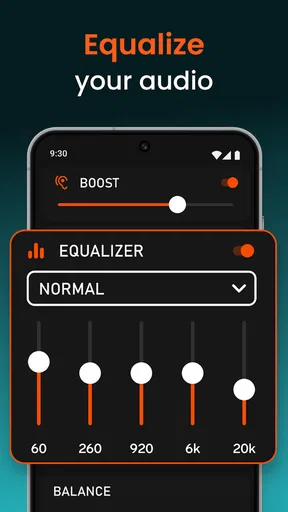
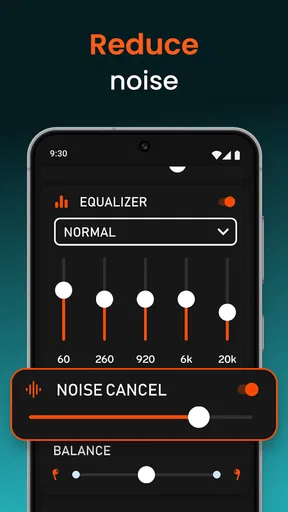
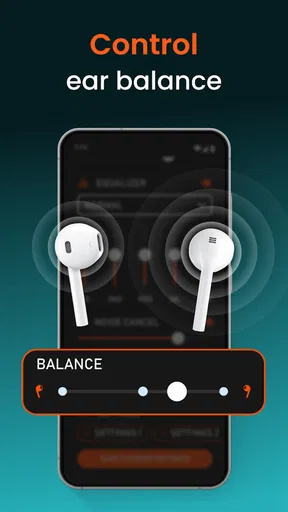
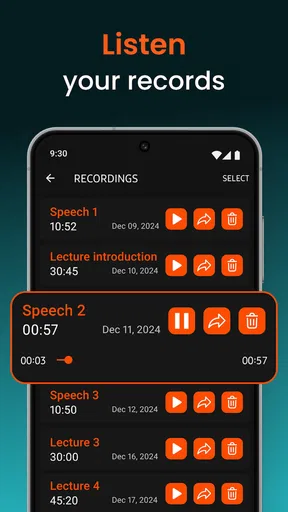
Our Review of Super Hearing from Distance
 Analysis by Appyee
I treat Super Hearing from Distance as a situational listening aid, not a way to make distant sound reliably clear. That distinction matters: a phone microphone can bring nearby audio into headphones, but it cannot separate every voice from a busy room or replace a hearing assessment. Used with realistic expectations, this medical app can be handy for a quiet TV, a lecture, or a conversation that is difficult to hear from where I’m sitting.
A practical routine starts with placement
My first recommendation is to decide what sound you want to hear before adjusting anything. Put the phone’s microphone toward that source, connect headphones, and begin at a comfortable volume. Aiming the microphone can matter more than repeatedly turning up amplification: if it faces away from the speaker, the app may simply make the room’s other sounds louder too.
For a one-to-one conversation, I would place the phone on a stable surface between me and the speaker, with the microphone unobstructed. For television, I would position it near the TV rather than keep it in my pocket across the room. These are simple habits, but they make the listening path more predictable and reduce the temptation to compensate for poor placement with excessive volume.
I’d also do a short sound check before relying on it for something important. Try a few seconds of ordinary speech, adjust the level gradually, and stop if the result is uncomfortable or distorted. The aim is easier listening, not maximum loudness. Headphones can make amplified sound feel intense quickly, especially when the source is close to the microphone.
Small checks that prevent frustrating sessions
Before a longer session, I’d confirm that the headphones are connected and that the phone’s microphone is not covered by a hand, case edge, or soft surface. A setup that works while holding the phone may change when it is placed on a table. I’d also check that the volume is comfortable before entering a noisy environment rather than trying to make a sudden adjustment in the middle of a conversation.
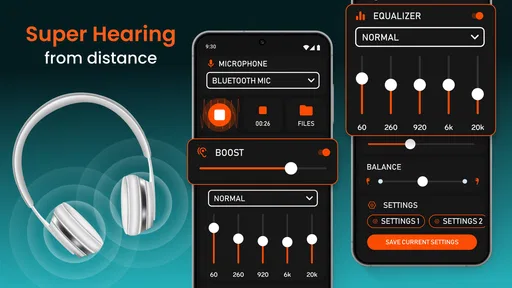
The app’s sensitivity, volume, frequency, and equalizer controls give experienced users room to experiment, but I would change one control at a time. If speech sounds harsh, lowering the overall level may be more useful than making several frequency changes at once. If the voice is still unclear, moving the microphone closer to the speaker is a better next test than assuming a stronger setting will recover details the microphone did not capture.
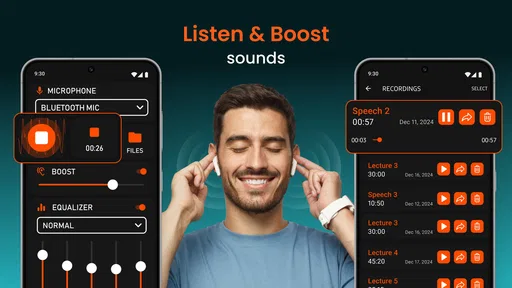
Recording deserves a separate check. A recording can be useful for revisiting permitted material, but it is not a substitute for listening carefully in the moment, and recording other people can raise privacy and consent issues. I would use that option only when it is appropriate, tell people when needed, and check local rules before capturing a meeting, class, or private conversation.
Where it fits among everyday alternatives
Compared with simply raising a television’s volume, this app offers a way to listen through headphones without making the whole room louder. That can suit someone sharing a home with others, though it depends on having a comfortable headphone setup and a microphone position that captures the TV clearly. If a television already offers headphone output or personal listening equipment, that may be the more convenient choice for regular viewing.
For a lecture or talk, the app may help when the phone can sit near the speaker and the venue is reasonably calm. It is less dependable when the speaker moves around, the phone must stay far away, or several people talk at once. In those cases, asking for a seat closer to the front, using a venue’s assistive listening system if available, or requesting written material may work better than turning up the phone’s amplification.
For ongoing difficulty hearing speech, I would not treat a general phone app as a hearing aid. A hearing professional can assess the cause and discuss suitable devices or support; that matters especially if the change is sudden, worsening, or affecting daily life. The app is better understood as an occasional aid or experiment than as a medical solution.
Who is likely to get the most from it?
I can see it helping someone who wants a little more access to a nearby sound source in a controlled setting: following a quiet television, listening to a presenter from a seat where the phone can be placed, or reducing the need to ask a companion to repeat a short sentence. It also suits curious users who want to explore how microphone placement and sound adjustments affect what they hear.
I’d skip it if I needed dependable understanding in a loud restaurant, a moving crowd, or an urgent situation where missing a word could have serious consequences. It is also a poor fit for anyone expecting the phone to pull one voice cleanly out of overlapping conversation. Amplification raises captured sound; it does not guarantee that the desired voice will become clearer than everything around it.
A realistic home routine might be to set the phone on a table near the television, connect headphones, and adjust the volume while the room is quiet. If another person starts talking nearby, I would expect that voice to come through too. For a family member who needs frequent support, I’d compare the convenience of this quick setup with dedicated hearing equipment and professional advice rather than relying on repeated phone adjustments as the long-term answer.
First Impressions and Interface
The first thing that caught my eye was the minimalist design of the app. Super Hearing from Distance doesn’t bombard you with unnecessary bells and whistles. Instead, it opens up to a clean interface that’s easy to navigate even for the most tech-averse user. The setup is straightforward—just plug in your headphones, and you’re ready to go.
One thing I appreciated was the clear instructions provided on the home screen. It’s all about functionality here, and the developers clearly aimed for simplicity. There’s a tutorial section if you need it, but honestly, you might not even glance at it. Everything seems intuitive enough.
How Does It Work?
The app utilizes your phone’s microphone to capture sound around you and then amplifies it through your headphones. The idea is to enhance your hearing ability, especially in environments where you might struggle to catch every word. Think of it as having a personal sound system in your pocket.
When testing it out at a café, I was able to pick up conversations from a couple of tables away—pretty nifty if you’re someone who’s always curious about the world around you. The app allows you to adjust the sensitivity and volume, so you can fine-tune your listening experience depending on your surroundings.
Performance in Different Environments
Now, let’s talk about the real-world performance. I took the app for a spin in various environments to see how it held up. At home, it worked like a charm, especially when I wanted to watch TV at a low volume without disturbing others. The clarity was impressive, and the background noise was minimal.
In crowded places like a bustling street or a busy restaurant, the app still performed well, although some sound distortion occurred with excessive background noise. But hey, it’s not magic; it’s technology! Still, I found it beneficial overall in enhancing speech and reducing the need to strain my ears.
Customization and Features
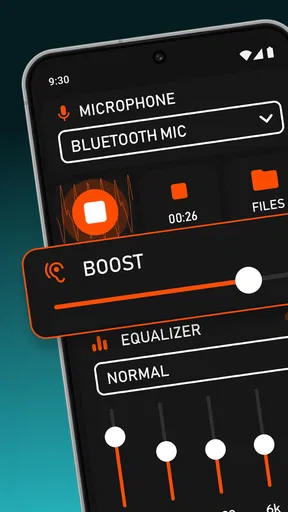
One of the app’s strengths is its customization options. You can adjust the frequency and equalizer settings, which is perfect for users who are a bit more tech-savvy. This feature allows for a tailored listening experience, whether you’re trying to catch a whisper or listen to music in a new way.
Additionally, there’s a recording feature. Ever wanted to save a lecture or an important meeting? Well, with a simple tap, you can record and play back audio. This added functionality turns the app into a versatile tool beyond just hearing enhancement.
The Battery Dilemma
Like many apps that rely on continuous microphone use, Super Hearing from Distance does put a strain on your battery. I noticed a quicker drain than usual, especially during prolonged use. It’s something to keep in mind if you’re planning to use the app extensively without access to a charger.
Final Thoughts
Overall, Super Hearing from Distance brings a unique twist to audio enhancement apps. It’s user-friendly, effective in most settings, and offers a fascinating way to explore audio around you. While it might not replace professional hearing devices, it certainly serves as a handy tool for those curious about improving their auditory experience.
If you’re looking for a way to enhance your listening ability, or just want to experiment with sound in a new way, I’d recommend giving it a whirl. Just remember to keep an eye on that battery!
What to expect before installing
As a free medical app from DOSA Apps, it is an easy one to try without paying up front. The app is rated for Everyone, and its current version is 1.1.6.5, with Android 5.0 as the minimum operating system requirement. Optional in-app purchases range from $0.99 to $99.99 per item, so I would check the purchase details in the app before confirming anything rather than assume every option is included at no cost.
Its average rating is 4.7 from around 12,000 ratings, and it has passed 500,000 installs. Those figures suggest plenty of people have tried it, but they don’t tell me whether it will suit a particular phone, headphone pair, or listening environment. I’d treat the app’s own performance in a short, low-stakes test as the more useful measure for my needs.
Building a repeatable listening habit
The useful “advanced” approach here is not a hidden mode; it is consistency. I’d keep one basic routine for quiet settings: position the microphone toward the sound, use a moderate level, and make one adjustment at a time. If I move from the television to a speaker across a room, I would reset my expectations and check the sound again instead of assuming yesterday’s settings will transfer perfectly.
For a class or presentation, I’d arrive early enough to choose a seat and place the phone where it can capture the speaker without being blocked. I would test with ordinary speech before the event begins, then avoid fiddling with the controls while someone is talking. That small bit of preparation is more useful than trying to troubleshoot during a key explanation.
There is also a practical trade-off between using headphones and staying aware of the space around me. Headphones make the amplified feed easier to hear, but they can reduce awareness of nearby sounds. I would keep the volume conservative and avoid relying on the app while walking near traffic, crossing streets, or doing anything that requires hearing the environment naturally.
Where patience matters more than amplification
Phone microphones are designed to capture sound around the device, not to behave like a directional microphone aimed perfectly at one distant voice. Reflections, wind, handling noise, and several people speaking can all affect what reaches the headphones. In a room with overlapping conversation, moving closer or asking someone to repeat a sentence may be more effective than trying every equalizer setting.
That is why I see this as a convenience tool, not a dependable accessibility system for every situation. Dedicated hearing devices and assistive listening equipment are designed for needs that a general-purpose phone app may not address. If I were missing conversations regularly, I would use this app only as a temporary aid while seeking more appropriate advice and support.
My verdict after weighing the trade-offs
I like the idea of having a simple way to route a nearby sound source into headphones, especially when raising the room’s volume would bother someone else. The app’s adjustable controls and recording option give it more flexibility than a basic volume change, while its straightforward purpose makes it approachable for a quick trial. Its best results, though, depend on placement, a manageable sound environment, and a listener willing to keep the volume comfortable.
My recommendation is to try it for specific, controlled listening tasks, not to expect it to solve every hearing challenge. If you want a quick way to experiment with amplified audio, it may earn a place on your phone; if you need reliable speech understanding across noisy or changing environments, a dedicated solution is the better direction.
Verdict
Strengths of Super Hearing from Distance
- Enhances distant sounds effectively.
- User-friendly interface design.
- Customizable sound filters.
- Compatible with most headphones.
- Low battery consumption.
Limitations of Super Hearing from Distance
- Requires stable internet connection.
- Limited features in free version.
- Advertisements can be intrusive.
- Not suitable for noisy environments.
- Privacy concerns with microphone access.
Other Releases by DOSA Apps
View All
Cube Cipher - Cube Solver
Educational4.5

Recover Deleted Photos App
Photography4.4

Cleanup Your Phone
Personalization4.5

Microphone Amplifier
Medical4.2
Similar Picks in This Category
View All
WebMD: Symptom Checker
WebMD, LLC4.1
Microphone Amplifier
DOSA Apps4.2

Anatomy Learning - 3D Anatomy
3D Medical OU4.5

Period Tracker and Calendar
SimpleInnovation4.9

GoodRx: Prescription Coupons
GoodRx4.8

CVS Health
CVS Pharmacy4.5
Frequently Asked Questions
What is Super Hearing from Distance, and how does it work?
Super Hearing from Distance is an app designed to amplify sounds from your surroundings, allowing you to hear distant conversations or subtle noises more clearly. It uses your device's microphone to capture audio and processes it to enhance the sound quality. Users can adjust the amplification levels to suit different environments.
Is Super Hearing from Distance safe to use for extended periods?
Yes, the app is generally safe to use, but it's important to monitor the volume levels to prevent potential hearing damage. Prolonged exposure to high volumes can be harmful, so always use the app responsibly and take breaks to rest your ears. Make sure to follow any additional safety guidelines provided within the app.
Does Super Hearing from Distance require internet connectivity to function?
No, Super Hearing from Distance does not require internet connectivity for its core functionality. The app operates using your device's built-in microphone and processes audio locally. However, internet access may be required for downloading updates or accessing additional features that might be available online.
What are the device requirements for installing Super Hearing from Distance?
Super Hearing from Distance is compatible with most modern Android and iOS devices. Ensure that your device is running the latest operating system version for optimal performance. The app may require access to your microphone and speaker, so make sure these permissions are granted during installation.
Are there any privacy concerns when using Super Hearing from Distance?
While the app uses your microphone to capture audio, it processes sounds locally on your device without transmitting them over the internet. This design helps protect user privacy. Always review the app's privacy policy for more detailed information on data handling practices and ensure that you are comfortable with the permissions requested.
